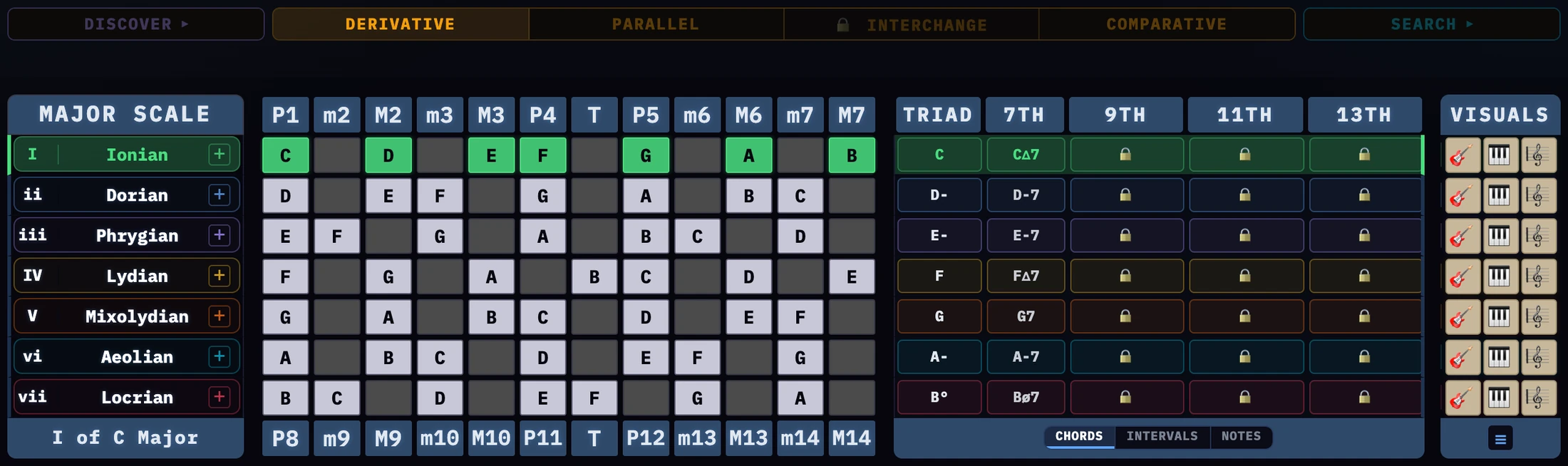
The Matrix puts scales, modes and chords on one two-octave frame of
intervals — the same frame for all three, read the same way every time.
No notation required.
01
The matrix panel
The twelve columns
The matrix panel
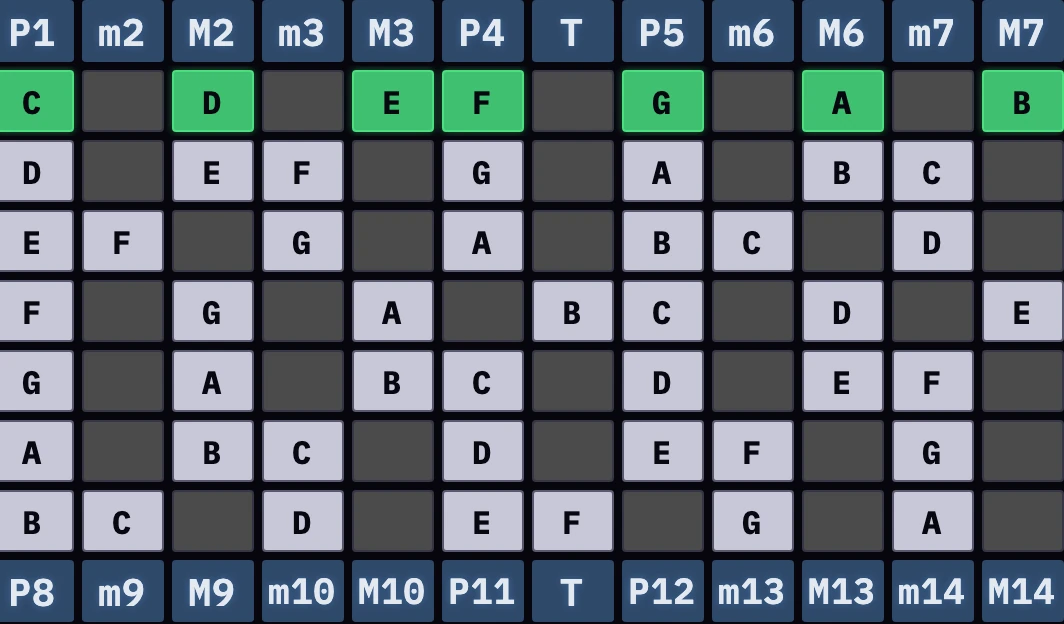
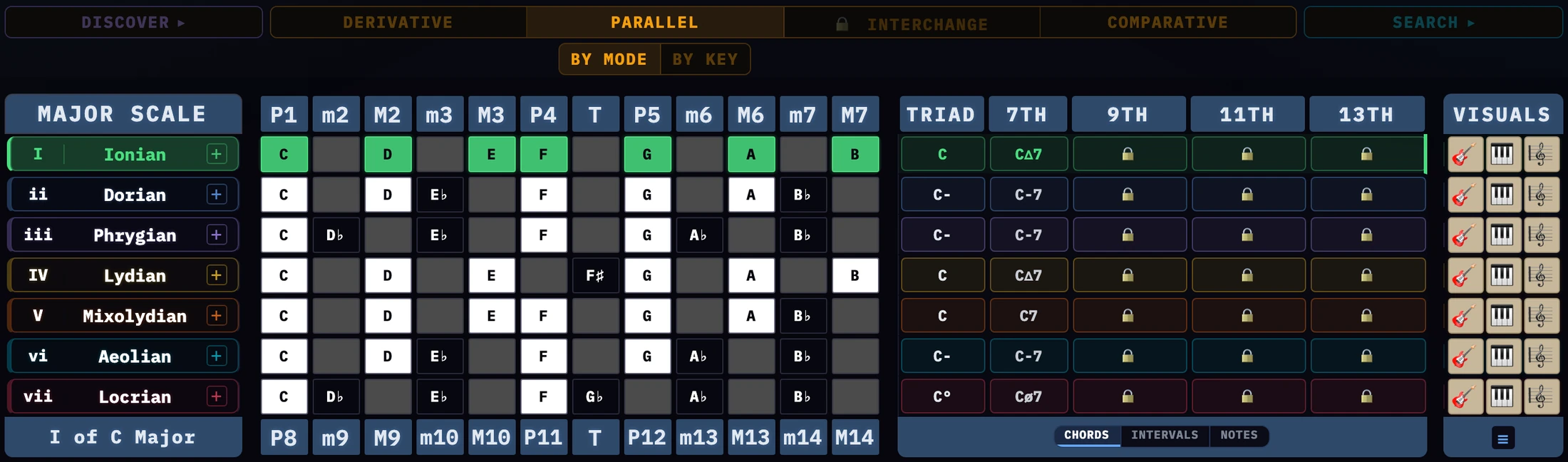
The middle panel is the matrix itself, and everything else on screen is in service of it. Twelve
columns, one per semitone, each an interval — a distance, not a note — measured from
the root of that row’s mode.
Those twelve intervals are the chromatic scale: every interval there is. Nothing is ever added here. A
mode is simply which of the twelve are lit, and a row’s shape is the whole of what it is.
A strip runs above the panel naming those twelve P1…M7,
and another below naming them again an octave up, P8…M14.
Together they are the two-octave frame, and any scale built from the twelve semitones fits
inside it. It is also why a
fretboard repeats every twelve frets and a keyboard every twelve keys — both instruments are the
same conveyor of repeating intervals, and this panel is the theory underneath them. Section 2 names all
twenty-four.
02
Intervals
Reference
P1 – M7, above the gridP8 – M14, below it
Each column is named by its distance from the root of the mode on the row — not from
the key. The strip above the matrix gives the first octave of those names and the strip below gives the
second, and between them they are the chromatic scale twice over. P is perfect,
M major, m minor, T the tritone — the six-semitone step that belongs to
neither side.
Semitones
First octave
Second octave
Called
From C
0
P1
P8
Unison, then the octave
C
1
m2
m9
Minor Second
D♭
2
M2
M9
Major Second
D
3
m3
m10
Minor Third
E♭
4
M3
M10
Major Third
E
5
P4
P11
Perfect Fourth
F
6
A4TD5
A11TD12
Tritone — see below
F♯
7
P5
P12
Perfect Fifth
G
8
m6
m13
Minor Sixth
A♭
9
M6
M13
Major Sixth
A
10
m7
m14
Minor Seventh
B♭
11
M7
M14
Major Seventh
B
Twelve columns, twenty-four names. The grid is twelve wide, but every column is read twice
— once as itself and once an octave up — and that pair is the two-octave frame the whole
Matrix sits in. A 9th is a 2nd an octave up, an 11th is a 4th, a 13th is a 6th. Same column, same
distance, different name for it.
Which name applies is a question of spacing, not of pitch. Play a mode step by step and you are in the
first octave; leapfrog a chord up past the seventh and you are naming the same columns in the second.
That is why the app puts one strip above the matrix and the other below it.
Why the tritone is just T
Every other column has one name per octave. The tritone has two, which is what the row above shows:
an augmented fourth or a diminished fifth below, an augmented eleventh or a
diminished twelfth above. Same interval either way, named by chord construction.
In a chord symbol it turns up as ♯4, ♭5 or
♯11 for the same reason — the chord decides the spelling, and the
note does not care.
So the matrix writes T and leaves it open. A column has no chord around it to decide the spelling,
so picking one of the four would be a guess.
Why chords count past seven
Once a seventh is in a chord, the notes stacked above it keep counting from the bottom instead of
resetting — which is why the chord columns read 9, 11 and 13 rather than 2, 4 and 6.
03
The modes panel
Naming the rows
The modes panel
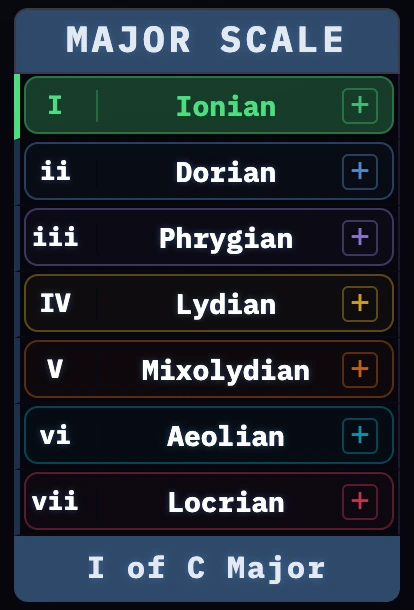
The left-hand panel names every row. Its header reads MODES — or CUSTOM in
Comparative, where the rows are your own chords rather than one scale’s modes.
Click a row to select it. Everything else on screen follows the row you pick — the chord
columns, the interval strips, the instrument views.
The origin caption
Underneath the panel sits the line that matters most: the selected row’s origin, written
as a roman numeral and a parent scale — ii of C Major, V of
G Melodic Minor.
That one line is chord, mode and parent on screen at once. Whatever you are looking at and however you
arrived there, this says where it came from. When a row stops making sense, read this first.
In Comparative the mode name is also a menu. A chord can sit in more than one mode —
CΔ7 is at home in both C Ionian and C Lydian — so pick the one you
meant and the row redraws around it.
The two row controls
+ sends that row’s chord to Comparative. It is on every row
in every tab, so anything you find anywhere can be sent there to compare.
☰ isolates the selected row. The others go, and the one left sits between
the two interval strips so it can be read against them with nothing in the way. It stays dim until a row
is selected, and a second click brings the others back.
04
The chords panel
What lives inside a mode
The chords panel
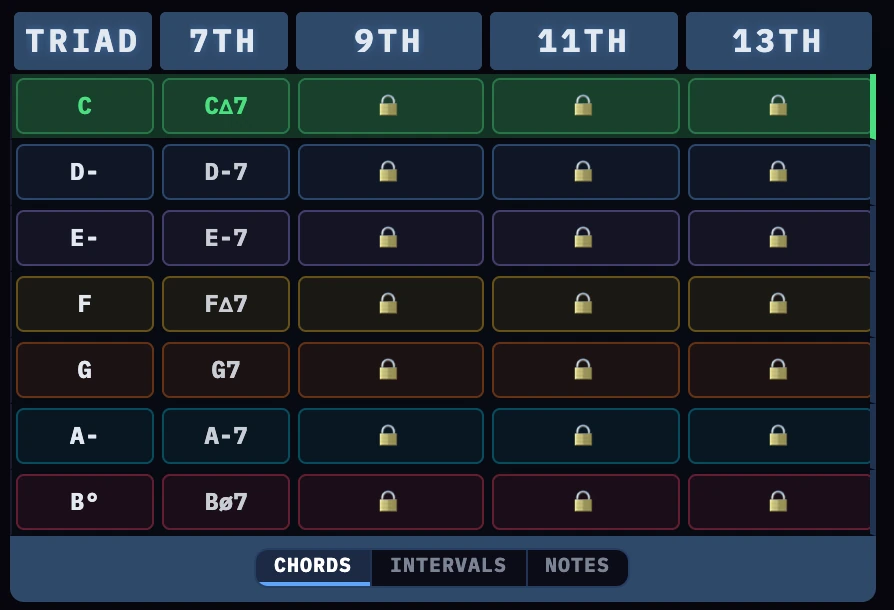
The right-hand panel holds the chords that live inside the row: TRIAD, 7TH, and then
9TH, 11TH and 13TH. They are not a separate subject from the mode beside them.
They are built from the lit cells immediately to their left.
Leapfrogging
Take the row’s root and skip every other lit cell — 1 3 5 7 9 11 13.
That skipping is leapfrogging, and these columns are leapfrogging drawn.
Keep going far enough and you arrive back at the whole mode, because the 9, 11 and 13 are the 2, 4 and
6 an octave up — which is what the lower interval strip is telling you. One set of notes, read at
two spacings. That is why a mode and its chords share a line here rather than two screens.
Each column names only what it adds. The 7TH column does not repeat the triad beside it, and
each extension column names the one note it puts on top.
Three ways to spell them
Under the panel sits CHORDSINTERVALSNOTES, which chooses how those columns are written. Take the A Aeolian row in
C:
As chords, the triad is A– and the seventh
A–7. As intervals, P1·m3·P5 and
m7. As notes, A·C·E and
G.
Nothing changed but the label. One lit cell wears three names at once — the ♭7 of G
Mixolydian is also the ♭7 of G7.
Clicking any chord opens it on an instrument, still inside the mode it came from.
The triad and seventh are free. 🔒9TH,
11TH and 13TH are in the full Matrix — see section 15.
05
Chord symbols
Reference
Every symbol in the chord columns is built from a small alphabet. Learn these nine marks and the rest
is combination.
Every table in this section runs simplest first: the plain chord, then the ones that alter a
single note, then the ones that alter more. Read down and you are walking away from the major triad one
step at a time.
The Intervals column names each note the way the grid does — by distance — not the
way the chord spells it. The two disagree on purpose. A ♭5 and a
♯11 are both T; a ♯5 is
m6; the ♭♭7 of a diminished seventh is
M6. Same note either way. The chord names it by construction, the grid names it
by distance, and the matrix is built on the second.
Mark
Means
Does what
–
Minor
Flattens the third. Other books write it min; the dash is the same chord
+
Augmented
Raises the fifth
♭5
Flat five
Flattens the fifth
Δ
Major seventh
The seventh is a semitone under the octave
7
Dominant seventh
Major third, flat seventh
sus2
Suspended second
The third is replaced by the second
sus4
Suspended fourth
The third is replaced by the fourth
°
Diminished
Flat third and flat fifth together
ø
Half-diminished
Diminished triad, but the seventh stays flat, not double-flat
Triads
Symbol
Name
Intervals
On C
C
Major
P1 · M3 · P5
C E G
C–
Minor
P1 · m3 · P5
C E♭ G
Csus2
Suspended second
P1 · M2 · P5
C D G
Csus4
Suspended fourth
P1 · P4 · P5
C F G
C+
Augmented
P1 · M3 · m6
C E G♯
C♭5
Major flat five
P1 · M3 · T
C E G♭
C°
Diminished
P1 · m3 · T
C E♭ G♭
Sevenths
Symbol
Name
Intervals
On C
CΔ7
Major seventh
P1 · M3 · P5 · M7
C E G B
C7
Dominant seventh
P1 · M3 · P5 · m7
C E G B♭
C–7
Minor seventh
P1 · m3 · P5 · m7
C E♭ G B♭
C–Δ7
Minor major seventh
P1 · m3 · P5 · M7
C E♭ G B
C+7
Dominant sharp five
P1 · M3 · m6 · m7
C E G♯ B♭
CΔ7♯5
Major seventh sharp five
P1 · M3 · m6 · M7
C E G♯ B
C7♭5
Dominant flat five
P1 · M3 · T · m7
C E G♭ B♭
CΔ7♭5
Major seventh flat five
P1 · M3 · T · M7
C E G♭ B
Cø7
Half-diminished
P1 · m3 · T · m7
C E♭ G♭ B♭
C°7
Diminished seventh
P1 · m3 · T · M6
C E♭ G♭ A
Extensions
The last three columns add one note on top of the seventh. A number on its own is the plain extension
— the three at the top of this table — and a flat or sharp in front of it is an alteration.
Alterations are what give a dominant chord its color.
Extensions live in the second octave, which is why the interval names below are the compound ones
— M9, not M2 — and why they are the names printed along the
bottom row of the matrix rather than the top.
Symbol
Semitones up
Interval
On C
9
14
M9
D
11
17
P11
F
13
21
M13
A
♭9
13
m9
D♭
♯9
15
m10
D♯
♯11
18
T
F♯
♭13
20
m13
A♭
Reading a long symbol. Take it left to right: root, then quality, then the seventh,
then anything stacked on top. C7♯11 is a C dominant seventh with a sharpened
eleventh — C E G B♭ F♯.
Roman numerals
The numeral beside each mode name is its degree within the parent scale, and its case carries the
quality: upper case for major and dominant chords, lower case for minor and diminished.
So in C major, I is C major and ii is D minor.
06
The key menu
Where it is measured from
The key menu
Above everything sit twelve cards, one per key. They decide where the whole grid is measured from
— not what is in it. The set of twelve intervals never changes; the key only says where it starts.
CHROM lists the keys in semitone order, the way they sit on an instrument. 5THS lists them
around the circle of fifths, the way they sit in harmony. Same twelve keys, two orderings, and which is
more useful depends on what you are looking for.
Clicking a key transposes everything below it at once. Every row, every chord column and every
instrument view moves together, because all of them are read from the same place.
In Comparative it means something else. A progression can modulate, so there may be
no single key to show. The lit card turns rose there and shows the root of the first row’s mode
— an anchor for transposing rather than a key. See section 10.
P.S. and E.S. — how the notes are spelled
At the right-hand end of the same row sits the spelling switch. It decides how the letters in the
matrix are written, and it never changes a single pitch — only the name written for it. On the
free Matrix it reads 🔒 E.S., naming the setting it would unlock; with
the full Matrix it names the setting you are currently in, P.S. or
E.S.
P.S. is piano spelling, and it is what you get by default. Where a scale’s correct
spelling runs past what most players can read — where it needs a double sharp or a
double flat — the whole scale is renamed after the keys you actually press.
D♯ Dorian ♭2 reads D♯ F G A B C D rather than
D♯ E♯ F𝄪 G𝄪 A𝄪 B♯ C𝄪: a note on a white key
is written as that letter, so E♯ becomes F and B♯ becomes C.
Keys that spell cleanly are left exactly as they are, C♭ and E♯ included.
G♭ major really is G♭ A♭ B♭ C♭ D♭ E♭ F, and renaming
that C♭ to B would set B♭ and B side by side — two names a letter apart for two notes
a semitone apart, which reads as a misprint in a key people actually play.
Inside a scale that is being renamed, notes on the black keys keep the names they already have.
B♭ is what that key is called, so it stays B♭ rather than becoming A♯ for the
sake of consistency.
E.S. is enharmonic spelling🔒, and it is the stricter
rule: every degree gets its own letter and the accidentals fall where they fall. It is how the scale is
written on a page, and it is what makes an interval countable — D♯ to
F𝄪 is a third because D and F are two letters apart, while D♯ to G
looks like a fourth.
The staff never follows this switch. It is always spelled the strict way, whichever
way the matrix is set — so to see the difference, open the staff and compare it with the grid.
That is also the quickest way to judge whether E.S. is worth it to you. See sections 14 and 15.
Most keys read the same either way, and the plain major scale never differs in any of the twelve keys
— none of them needs a double accidental to spell. Where there is nothing to rename the switch is
dimmed, which is it telling you so. D♭ or G♭ harmonic minor will show
it working.
Letters can repeat under P.S. D♯ Dorian ♭2 comes out
D♯ F G A B C D, with D at both ends. That is the price of naming every note after the key
you press, and it is exactly what E.S. is for if you would rather count letters.
07
Derivative
One key, seven modes
Derivative
Seven modes, one shape. Every row here is a mode of the same parent scale — the same
notes, read from a different starting point. Nothing about the shape changes from row to row. It
slides.
That is the fact this tab exists to make obvious, and it is the one that makes modes playable. Find
G Mixolydian and look at the row it sits in: C major. You are not learning a new scale. You are
starting a scale you already know from its fifth note.
Read the whole panel at once and you have all seven — one parent at the top, every mode it owns
beneath it. Chord, mode and parent seen whole, from the parent’s end.
The key strip follows the parent
Click a row to select it. The key strip moves to that row’s parent scale rather than its
root, so selecting C Dorian moves the key to B♭ — the key C Dorian comes
from.
That can read as the app changing key underneath you. It is not: the strip is answering “which
scale are these notes?”, and for C Dorian the answer is B♭ major. Parallel, the next
tab, is the view that holds the tonic still instead.
08
Parallel
One tonic, many modes
Parallel, by mode
By mode keeps the starting note the same and changes the notes. This is the view for hearing how
C Ionian and C Dorian differ, because both start on C.
That is the opposite of Derivative, where the notes stay and the starting point moves. The same
seven modes, read the other way round.
By key fixes the mode instead and walks it through all twelve roots — one mode, every key,
stacked.
09
Interchange
Borrowed chordsFull Matrix
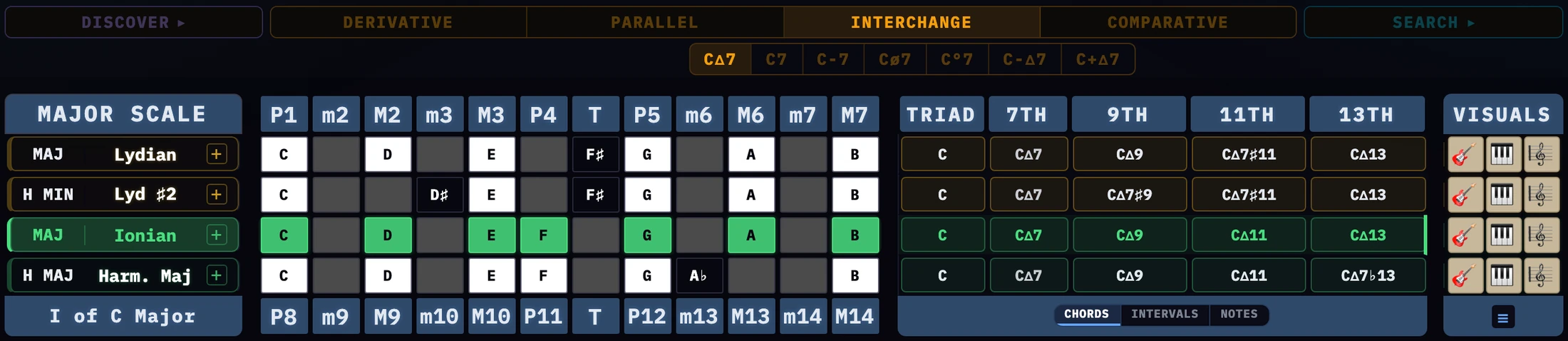
Interchange, shown unlocked
The chords available from scales that share the current tonic — what can be borrowed without the
music leaving the key it is in. The minor four in a major key, the flat six, the Neapolitan: they all
come from here.
Each row names the mode and the scale it comes from, so a borrowed chord can be traced back to
what it came out of rather than just sounding good by accident.
10
Comparative
A progression, side by side
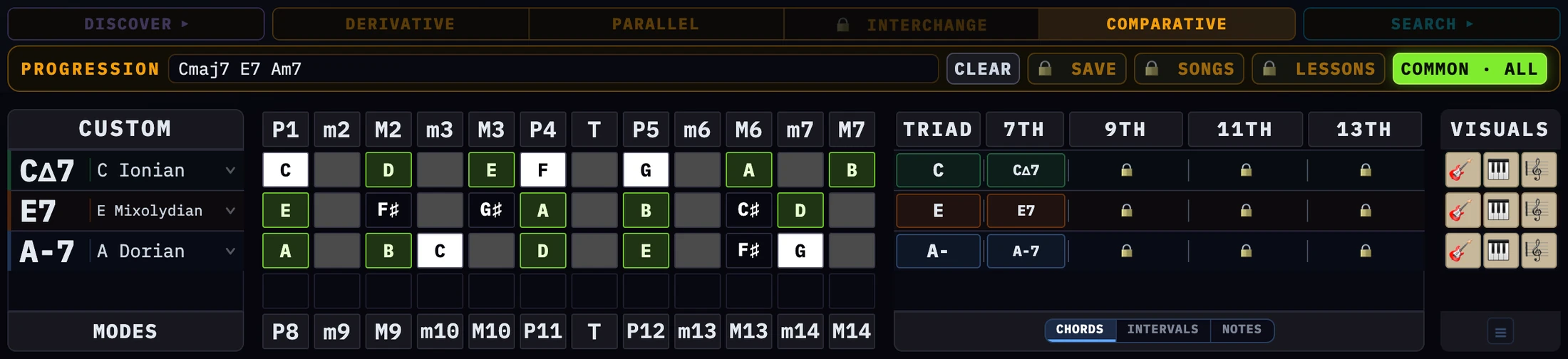
CΔ7 · E7 · A-7 with COMMON · ALL on — only D, E, A and B are held by all three
Comparative is the tab for a progression rather than a scale. The other tabs each show
one thing from an angle. This one puts several side by side and lets you read what they have in
common.
Type chords into the Progression field — D–7 G7 CΔ7
— and each becomes a row, carrying the parent mode it most likely came from. The panel header
reads CUSTOM rather than MODES, because these rows are yours and not one scale’s.
The mode name on a row is a menu: if a chord belongs to more than one mode, pick the one you meant
and the row redraws.
Rows can also arrive from the other tabs, by way of the + beside a mode
name — so anything you turn up in Derivative, Parallel or Interchange can be brought here and
held against the rest.
Common tones
This is what the side by side is for. The notes the rows share are the notes you can hold while the
chords move underneath them.
COMMON TONES cycles through three states: press once for
COMMON → NEXT, again for COMMON · ALL,
again to switch it off.
Next lights the notes the selected row shares with the row below it, in both rows. Click a
row — its name or any of its cells — to make it the top of the pair. The last row
pairs with the first.
All lights the notes every row in the matrix shares.
Both compare the scale each row draws, not its chord tones. While either is on the selected row
drops its mode color, so the only cells lit are the shared ones.
The key strip is not the key here. A progression can modulate, so there may be no
single key to show. What lights up instead is the root of the first row’s mode — the
anchor. It is there to transpose: click any other key and the whole progression moves by that interval,
first chord onto the key you clicked and every later chord the same distance behind it, whichever row
happens to be selected. The lit card turns rose in Comparative rather than amber, to mark that it
is reading as an anchor and not as a key.
The anchor, lit rose
11
Songs & Lessons
Two shelvesFull Matrix
Save, Songs and Lessons
Save stores whatever is in the Progression field, and asks which shelf it belongs on.
Songs is for what you are writing — a progression you want back tomorrow in the state you
left it.
Lessons is for what you teach from. A minor ii-V-i, a major ii-V-I, a blues I-IV-V, the pop
turnarounds: saved once, recalled in front of a student without hunting for them, and kept apart from
whatever is half-finished on the song shelf.
Each entry keeps its key and its title, and either shelf can be renamed or cleared item by item.
12
Discover
Browsing the scales
Discover
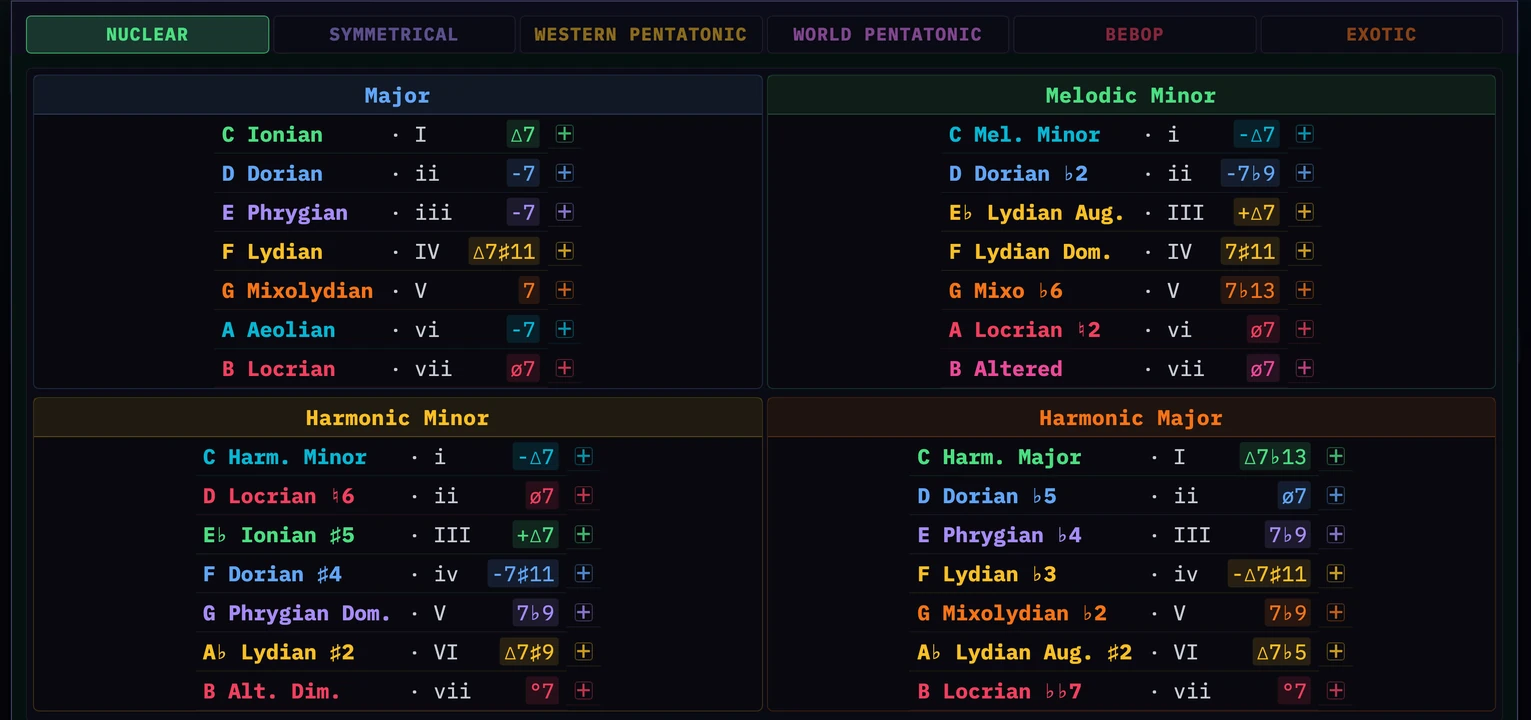
Every scale the app knows, grouped: Nuclear is the four parent scales that carry the twenty-eight modes
between them, then Symmetrical, the two pentatonic sets, Bebop and Exotic — 32
scales in all.
Nuclear is the foundation; the rest is variety. When a G7 is in front of you and the seven
options the parent scales give you are not the sound you want, this is where you step outside them
— hexatonic, octatonic, pentatonic, and heptatonic scales from outside the western tradition. The
chain is the same: the chord still belongs to a mode, and the mode still has a parent. Only the family
changes.
Click any mode to put it in the matrix. The panel closes and the matrix redraws around it.
13
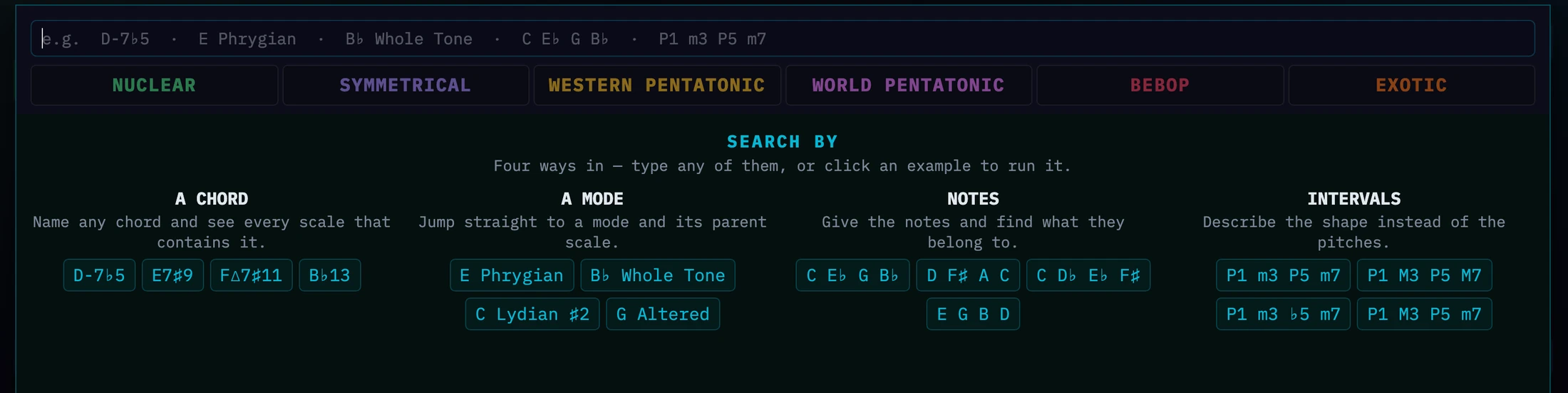
Search
What contains this chord
Search
Type a chord D–7♭5, a mode E Phrygian, the notes
themselves C E♭ G B♭ or the intervals P1 m3 P5 m7.
The answer is every mode that contains it, grouped by scale family. The pills across the top are the
panel’s header. They are there the moment Search opens, naming the six families you are about to
search across; once you have searched, each carries its count and picks the family listed below. A
family your chord is not in dims rather than disappearing, so the row never moves under you.
The families are not judged alike. A seven-note scale has to contain every note of your chord to
qualify; a five-note scale only has to hold two of them, and must avoid the ♭9 when the chord is
a dominant. That is why the pentatonic counts run so much higher — they are answering an easier
question.
Pick one and it loads into the matrix with the chord’s own tones lit inside it. This is the fastest
way to answer “what can I play over this?”
14
Visuals
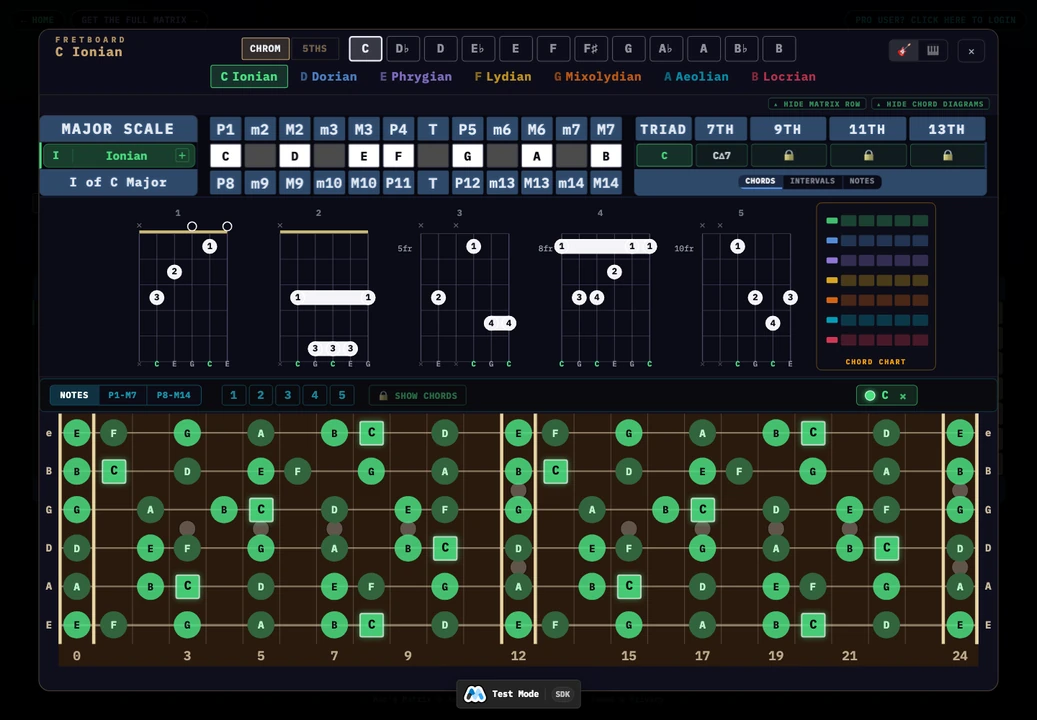
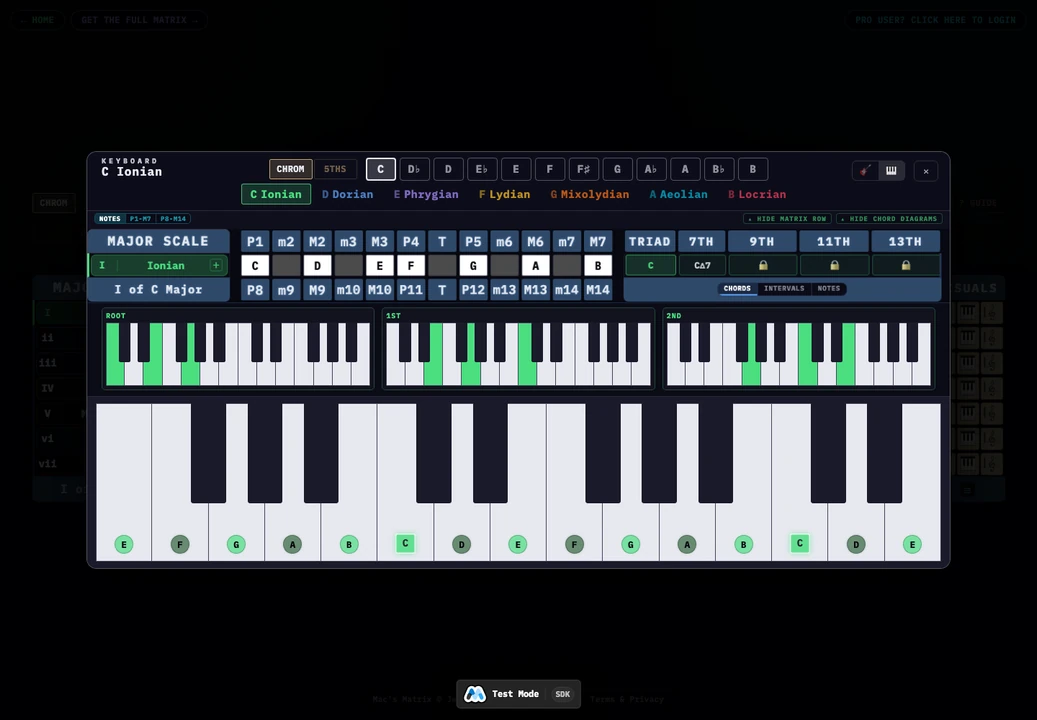
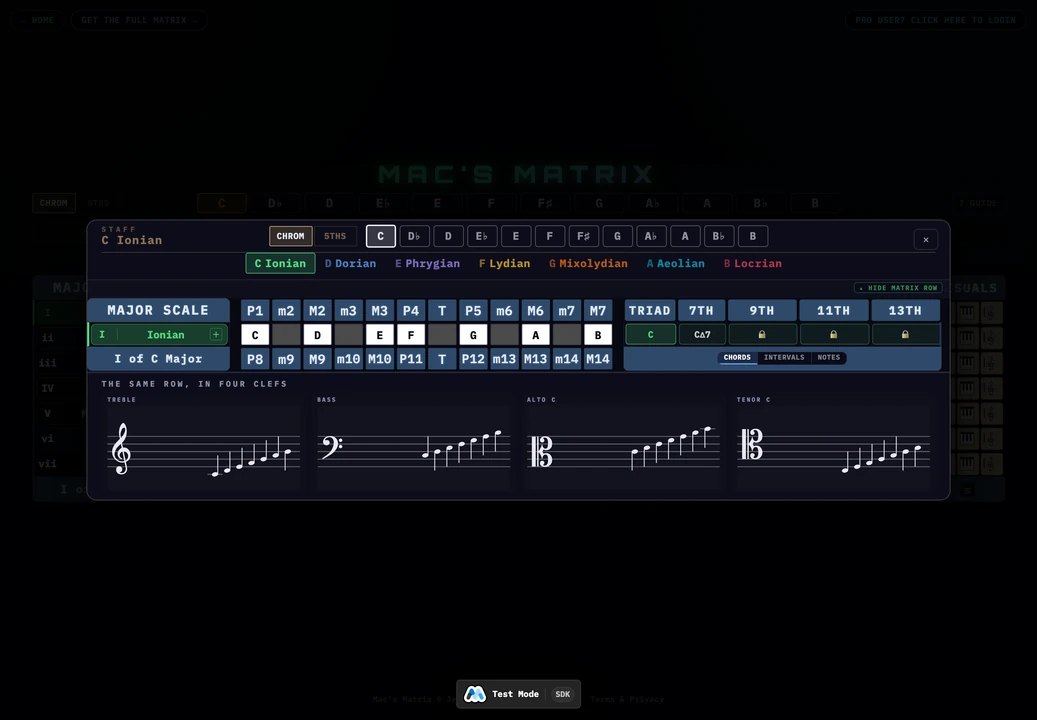
🎸🎹🎼Inside the instrument views
The fretboardThe keyboardThe staff
The narrow panel on the far right of every row is the way out of the grid and onto the
instrument in your hands. Its header reads VISUALS, and it carries three icons on every
row — 🎸 guitar, 🎹 keyboard,
🎼 staff. The matrix tells you which intervals; these put them
under your fingers.
Whichever you open, the same row from the matrix sits along the top of it. That pairing is deliberate
— the column you are reading up there is the dot you are looking at down here.
🎸 and 🎹 in the corner switch instrument
without closing anything, so the same mode can be seen on both. Clicking a chord symbol on the row keeps
you on whichever board you are already on.
Naming the dots
NOTESP1-M7P8-M14 chooses what
the dots say: letters, intervals, or the same intervals an octave up. The middle setting is the one that
teaches — letters tell you where you are, intervals tell you what you are, and the third
shows the two-octave frame of section 1 laid out on a real instrument. The same dot, named three ways.
Guitar
Chord-scale position 1 to 5 picks which part of the neck to show. Notes outside the positions
you have chosen are hidden, so a position reads as a box you can actually grab rather than the whole
neck lighting up at once. Position 1 is free; Full Matrix opens 2 to 5.
Show chords draws the chord shapes inside the positions you have selected, and the cards above
the neck are those shapes on their own, with fingerings.
Keyboard
A guitar has five positions for one chord; a piano has none — the same notes in the same place
every time. What it has instead is inversions, so the cards above the keys are the chord voiced
up from each of its own tones: root position, then first, second, and third for a seventh. Watch the
shape climb to the right as the bass note rises.
All four cards keep the same two-octave frame rather than cropping to each voicing, so the inversions
can be compared to each other by shape.
Staff
Nothing in the Matrix requires you to read notation, and the logic is never explained in it. The staff
is here as reinforcement: if you do read, it ties what you are seeing back to the page you
already know. If you do not, you can ignore it and lose nothing.
The row is written out in all four conventional clefs at once — treble, bass,
alto and tenor — each with its own key signature, so a violist and a bassist can read
the same mode off the same screen.
The staff is also this app’s fixed point for spelling. It is always written diatonically —
one letter per degree, double accidentals included — however the spelling switch in the key
menu is set. If the matrix says F where the staff says E♯, that is
not a disagreement: it is one pitch, named twice. See section 6.
The free Matrix includes all three instruments, position 1 and Show chords.
Positions 2 to 5 are the part behind the wall — see section 15.
15
Free & full
What a lock means
A 🔒 marks something in the full Matrix. Nothing is hidden — you can
see what is there and decide whether you want it.
Free is the nuclear families and their modes, in every key. Derivative, Parallel, Discover and
Search come whole; Comparative takes up to three chords; the fretboard, keyboard and staff cover
position 1 with Show chords; and every row names its triad and seventh.
The full Matrix adds the other 28 scales — symmetrical, both pentatonic sets, bebop and
exotic. With them come Interchange, the 9th, 11th and 13th columns, chord-scale positions 2 to 5,
E.S. spelling, Comparative with no cap, and the Songs and Lessons shelves.